
My LisaHost experience and VPS setup notes
I previously used a LisaHost US 9929 VPS with one CPU core, 1GB of memory and advertised bandwidth of 60Mbps in each direction. While setting up another VPS recently, I worked through the panel, subscriptions and phone and desktop clients again. Two problems were particularly easy to misread: a node could report latency while failing to load a webpage, and VLESS and HY2 could show very different speeds on the same computer.
This article starts with the LisaHost plan I used, then follows the setup and troubleshooting process on the new server. If you are choosing a VPS, the first section gives a concrete example. If you already have one, the later sections explain what I checked when the connection did not behave as expected.
This article contains my LisaHost affiliate link. I may receive a commission if you buy through it. The old LisaHost instance and the later tests on my new VPS, named AKE, are labeled separately throughout.
The LisaHost plan I used
The old instance’s dashboard showed the following:
| Item | My previous instance |
|---|---|
| Network | US, Los Angeles, 9929 |
| Resources | One CPU core, 1GB RAM, 20GB storage |
| Operating system | Ubuntu 22.04 |
| Advertised bandwidth | 60Mbps upload and 60Mbps download |
| Traffic allowance | 2000GB shown in the dashboard |
| Historical renewal price | CNY 118.80 per quarter, equivalent to CNY 39.60 per month |
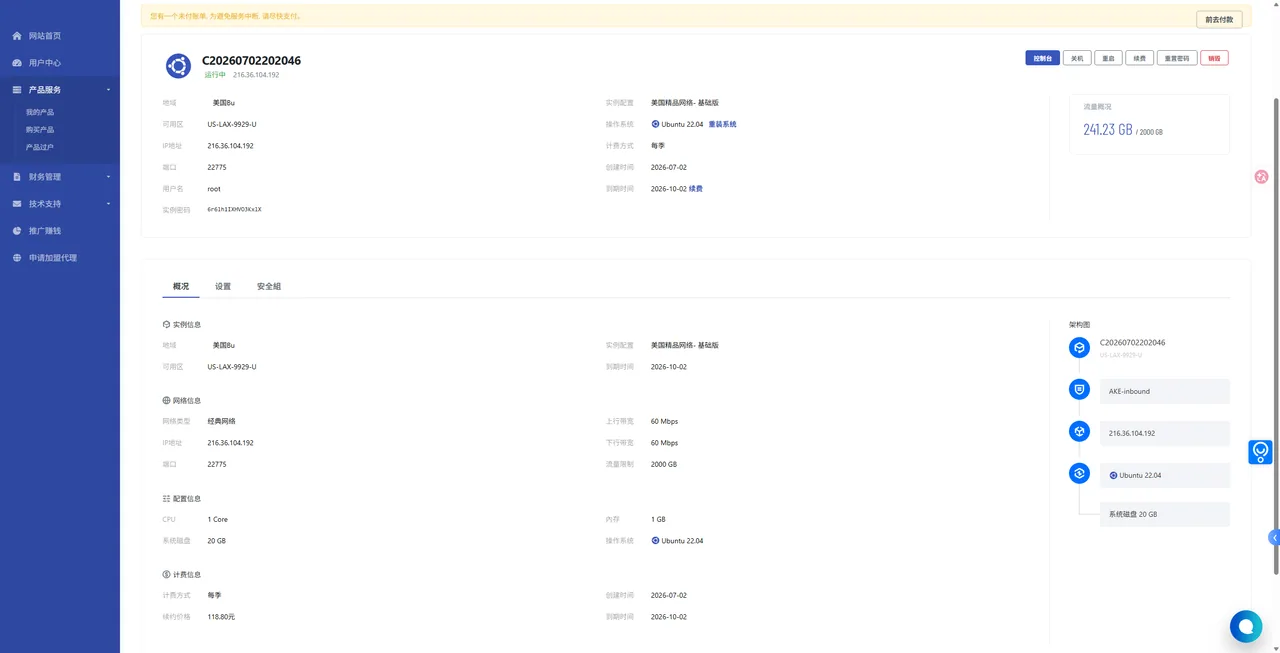
What appealed to me was having a small machine I could manage myself: install the services I need, keep my configuration and adjust it to the job. A personal site, a lightweight Docker service, scheduled tasks, a bot or automation that calls an external API can provide a useful starting project.
LisaHost is worth including in a VPS comparison. Its official catalog lists locations including the US, Hong Kong, Japan and Singapore, with options marketed as optimized for mainland China’s three major carriers and products using 9929 routes. Check the exact plan’s location, bandwidth and traffic allowance, then test it from your own ISP connection.
How I organized the setup for desktop and phone testing
The new server is called AKE in my records. I wanted to use v2rayN on Windows and Shadowrocket on iPhone, while keeping account management in one place. The arrangement was:
VPS → 3x-ui panel → VLESS + REALITY and HY2 → one subscription → client apps.
I divided the work into three parts.
Establish the management layer. Confirm access to the server and panel, keep a configuration backup, then use the 3x-ui API to manage accounts, connection settings and subscriptions. This gives me one place to maintain the setup and a server configuration to compare with exported client settings.
Prepare two connection methods. I configured VLESS + REALITY and kept HY2, or Hysteria 2, as another option. Each method needs its own connectivity check before being included in a subscription. Several VLESS accounts had different names but shared the same server and entry point.
Check the phone and desktop separately. After importing the subscription, choose one node and load real websites and services before measuring upload and download. A working desktop connection does not establish compatibility on the phone.
This public article covers the process without listing installation commands or complete settings. You can contact me through the Lark section below to discuss panel deployment, API use and subscription organization.
A latency result did not mean websites would load
The first symptom was clear: HY2 worked, while the VLESS accounts reported latency but failed to provide normal browsing. The phone was running an older Shadowrocket version.
We first checked that the account, subscription and server settings agreed, then compared the handshake behavior of different client and server versions. The controlled tests showed a compatibility difference. With a compatible server version, real HTTPS requests passed for the accounts we tested.
We also examined the REALITY target’s handshake. The low number reported by the panel measured the VPS-to-target connection. It did not measure my phone or computer’s complete path to the VPS, and could not establish throughput.
For this kind of symptom, I now separate account configuration from version compatibility, and verify an actual request. A green latency result in a list is only one part of the evidence.
Why five accounts all appeared slow
Next, the Windows client showed a puzzling difference. On the same computer and local network, several AKE VLESS accounts measured roughly 1MB/s, while HY2 was around 8MB/s. I wondered whether a speed cap had been configured.
The configuration check found no account rate cap. VLESS had Vision enabled and Mux disabled. We then found that v2rayN’s mixed-test concurrency was set to five: the five VLESS accounts started together, while HY2 was tested separately afterward.
Five account names did not represent five independent routes. Simultaneous tests shared the available bandwidth, so the individual figures were not a fair measure of a single account tested alone. That version’s v2rayN implementation distinguishes sequential speed testing from concurrent mixed testing.
I subsequently retested and confirmed that desktop speeds were satisfactory. Concurrency was a significant complication in interpreting the batch test; it does not, by itself, establish why an earlier browser test showed lower upload speed.
The retest results and how I compare speeds now
These saved results are from the new AKE VPS, using v2rayN on the same computer and local network.
| Test | Download | Upload |
|---|---|---|
| Later VLESS + REALITY retest | 69.98 Mbps | 52.35 Mbps |
| Earlier HY2 test | 61.87 Mbps | 71.02 Mbps |
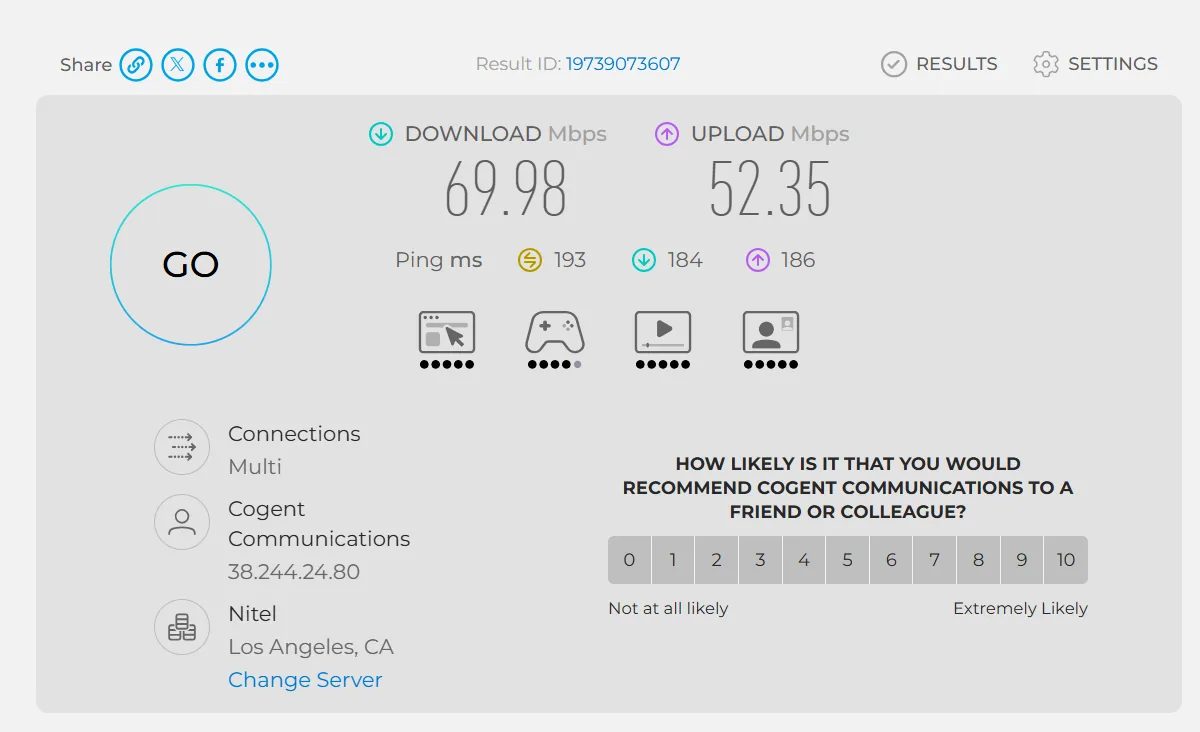
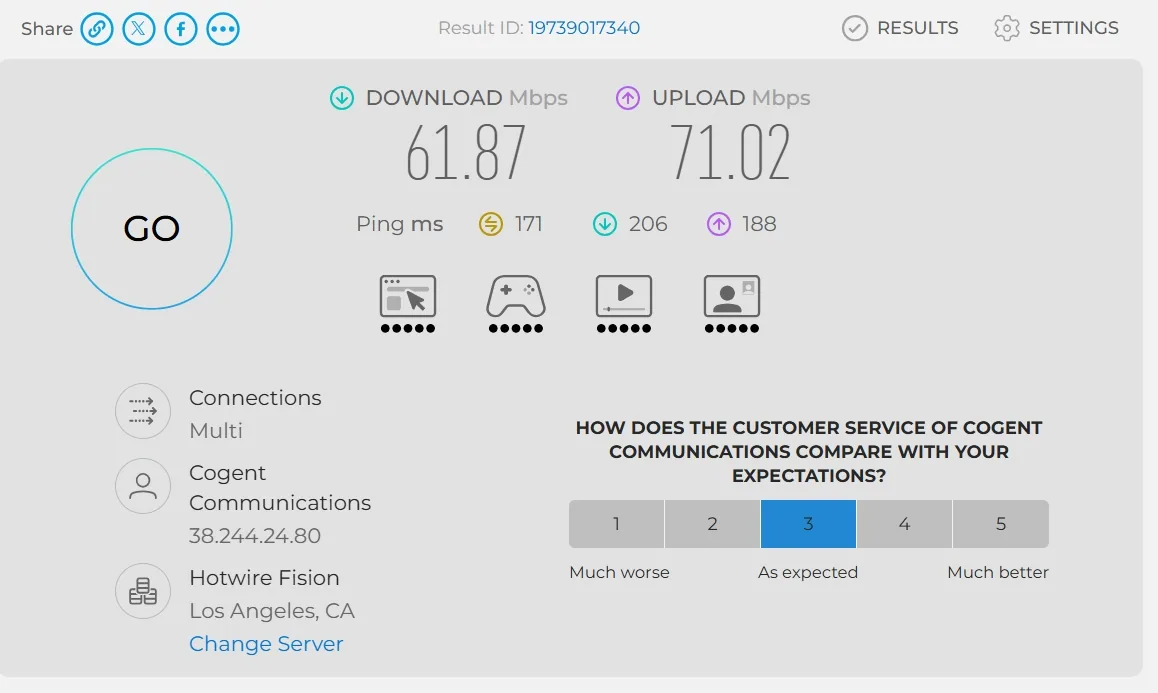
The tests used different servers at different times. They are records of what I observed, rather than a controlled ranking of protocols or performance data for the earlier LisaHost plan.
For comparisons now, I keep the computer, network and test server consistent and test one node at a time. I also check the units: v2rayN’s MB/s differs from a browser speed test’s Mbps. Afterward, I return to my usual sites and services to assess the experience.
My LisaHost link and coupon
If you are choosing a VPS, you can use my link to check LisaHost’s current plans:
Check current LisaHost networks and plans
Coupon: TS-CBP205DQJE.
In my saved checkout screenshot, an annual higher-tier plan fell from CNY 720 to CNY 648, a saving of CNY 72. The page identified it as a 10% renewal discount. This was a different plan from the quarterly basic instance described above.
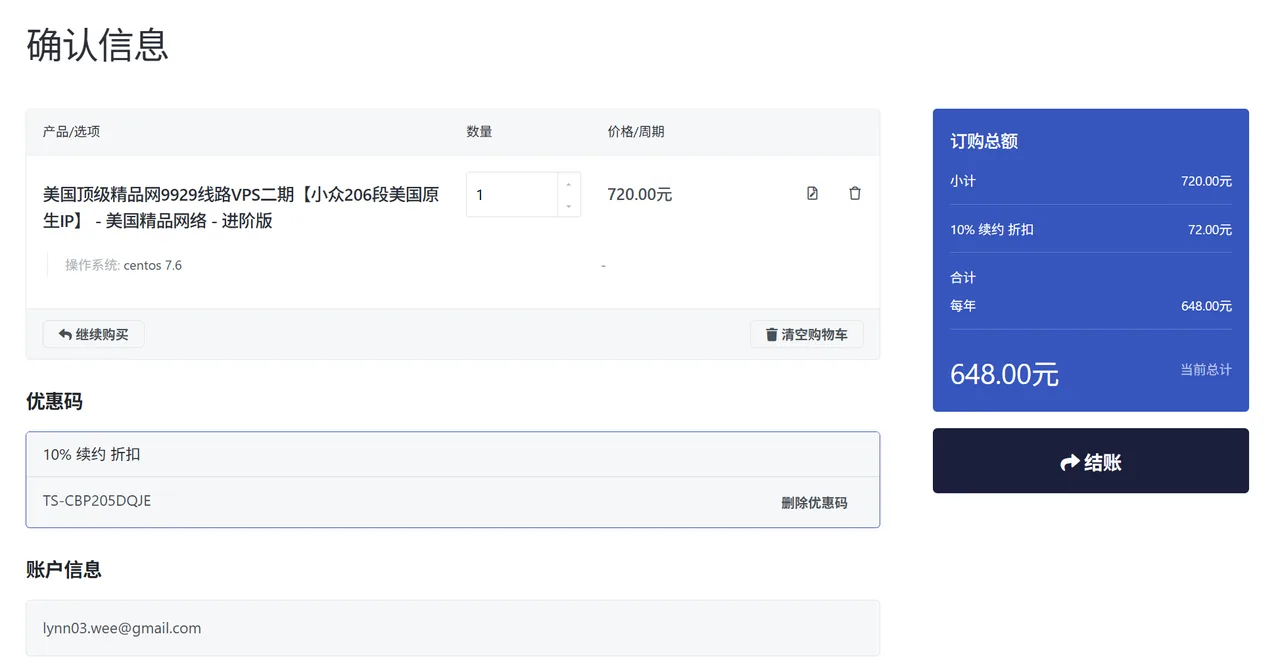
Choose the location, plan and billing period, enter and validate the coupon, then confirm the adjusted total before paying. This GitHub reference also documents the code. LisaHost advertises a 48-hour refund arrangement, but some trial products exclude refunds, so check the selected product’s terms.
If you already have a server and want to discuss 3x-ui, subscriptions, Shadowrocket or v2rayN configuration, add me through the Lark contact section below and mention “VPS setup.” Include your client version, ISP and the symptoms so we can start with a concrete problem.